
Introduction
In the crowded CRM landscape of 2026, Capsule CRM stands out as a beacon of simplicity and efficiency, specifically designed for Small and Medium-sized Businesses (SMBs) overwhelmed by complex, enterprise-grade solutions. The market is saturated with options bloated with features that lead to implementation fatigue, low user adoption, and a negative return on investment. SMBs don't need a system that does everything; they need a system that does the right things exceptionally well.
Streamline your software evaluation process
This is the precise niche that Capsule has carved out for itself. In a global CRM market projected to surpass US$145 billion by 2030, this platform champions a philosophy of powerful simplicity. It’s designed from the ground up to help businesses organize contacts, manage sales pipelines, and build better customer relationships without the steep learning curve. Its focus on core functionality and intuitive design positions it perfectly for SMBs navigating an increasingly complex digital landscape, prioritizing user adoption and rapid ROI.
This 2026 overview will provide a comprehensive analysis of Capsule, exploring its features, pricing, core strengths, and potential weaknesses. We will also dissect its integration capabilities and stack it up against key competitors to help you determine if this streamlined CRM is the optimal growth partner for your business.
Key Takeaways
Simplicity First: Capsule CRM remains a top choice in 2026 for small to medium-sized businesses (SMBs) seeking a minimalist, easy-to-use interface without the bloat of complex enterprise systems.
Core Strengths: It excels in straightforward contact management, visual sales pipelines, and task tracking, making it ideal for teams that need to get up and running quickly.
Pricing & Value: Capsule offers highly competitive pricing tiers, including a generous free plan for beginners and affordable premium options that scale predictably with growing teams.
Seamless Integrations: While it avoids building complex native marketing tools, it integrates smoothly with essential platforms like Google Workspace, Microsoft 365, Mailchimp, and Xero.
Top Alternatives: If your business requires advanced marketing automation or heavy enterprise customization, competitors like HubSpot CRM, Zoho CRM, or Pipedrive may be better suited to your needs.
Pros and Cons of Capsule CRM
No CRM is perfect for every business. A balanced evaluation requires an honest look at both its strengths and its limitations from an SMB perspective.
Advantages for Small Businesses
Exceptional Ease of Use: This is Capsule's biggest selling point. The learning curve is minimal, which means teams can get up and running in hours, not weeks. This significantly boosts user adoption and reduces training overhead.
Clean, Uncluttered Interface: The minimalistic design ensures users are not distracted by a sea of buttons and menus. It keeps the focus on core tasks: managing contacts and closing deals.
Affordable and Transparent Pricing: The pricing tiers are clear, predictable, and offer excellent value for the features provided, making it accessible for even the smallest businesses.
Robust Core CRM Features: While simple, Capsule masters the fundamentals. Its contact management, sales pipeline, and task features are powerful and well-integrated.
Strong Integration Ecosystem: The platform plays well with the tools SMBs already use, from accounting software to email marketing platforms.
Potential Limitations to Consider
Limited Advanced Automation: While Capsule's 'Tracks' feature is useful for basic workflows, it lacks the sophisticated, multi-step automation and lead nurturing workflows found in platforms like HubSpot or Pipedrive. However, for SMBs requiring more complex automation, Capsule's robust Zapier integration can bridge this gap, connecting it to thousands of other apps to create custom workflows without significant development.
Standard Reporting Suite: The built-in reports cover the essentials, but businesses that require deep, granular analytics or highly customizable dashboards may need to export data or integrate with a dedicated business intelligence tool.
Fewer Native Features: Unlike all-in-one platforms such as Zoho CRM, this solution focuses on being a great CRM and relies on integrations for other functions like marketing automation or customer service ticketing. This can be a pro for businesses that prefer a best-of-breed approach but a con for those wanting a single, unified platform.
Best for: Small teams seeking a simple, smart CRM with offline access.
Verdict: Capsule CRM blends ease of use, practical AI, and smooth data migration for streamlined client management.

Software covered in this article
To help you evaluate Capsule in the right context, this article compares it against a carefully curated set of competitors:









What is Capsule CRM?
Capsule CRM is a cloud-based solution that focuses on delivering core customer relationship management functionalities through a clean, intuitive, and user-friendly interface. It's built for individuals, small teams, and growing businesses that need a centralized hub for their customer data but are often overwhelmed by the complexity of larger platforms like Salesforce or even the more advanced tiers of HubSpot.
📊 See how Capsule stacks up to Zoho, HubSpot, and Pipedrive for your specific needs
A Brief History and Philosophy (Minimalistic Design & Simplicity)
Launched in 2009, Capsule was conceived from a desire to create a CRM that was easy to adopt and a pleasure to use. The founders recognized a significant gap in the market: SMBs were struggling with clunky spreadsheets or overly engineered systems. The core philosophy has always been to strip away the unnecessary complexity and focus on the essentials: contact management, sales pipeline, and task organization. This commitment to minimalistic design and simplicity is not about offering fewer features, but about offering the right features in the most accessible and powerful way possible for SMBs. This approach is particularly relevant today, as studies show that 91% of businesses with over 11 employees now use a CRM, making ease of use a critical factor for successful implementation and team-wide adoption.
Key Features of Capsule CRM (2026)
Capsule's feature set is intentionally focused on empowering SMBs to manage their customer lifecycle efficiently. It provides the essential tools needed to turn leads into loyal customers without requiring a dedicated administrator.
1. Contact Management & Organization
At its heart, Capsule is a powerful address book. It provides a 360-degree view of every contact, whether they are a person or an organization. You can store not just names and email addresses, but also social media profiles, communication history, and custom information relevant to your business.
Unified Contact View: Every email, note, file, task, and sales opportunity related to a contact is stored in one centralized place. For a local consulting firm, this means any team member can instantly see the entire history of a client relationship before a meeting.
Custom Fields & Tags: This is where the platform's simplicity becomes powerful. You can create custom fields to store industry-specific data (e.g., 'Subscription Tier' for a SaaS startup) and use tags for dynamic segmentation (e.g., 'Hot Lead', 'Past Client', 'Newsletter Subscriber'). This allows for granular organization and targeted communication.
Data Import & Duplication Handling: Capsule makes it easy to import contacts from Outlook, Google Contacts, CSV files, and other sources, with intelligent features to help identify and merge duplicate entries, ensuring data hygiene from day one.
2. Sales Pipeline & Opportunity Tracking
For most SMBs, visualizing the sales process is critical for forecasting and growth. Capsule's sales pipeline is a standout feature, offering clarity and control over your sales funnel.
Visual Kanban Pipeline: Opportunities are displayed as cards on a drag-and-drop board, with columns representing stages in your sales cycle (e.g., 'Qualified', 'Proposal Sent', 'Negotiation'). This visual approach allows a sales manager at a digital marketing agency to see the status of all deals at a glance.
Milestones & Tracking: Each opportunity has its own page where you can track its value, expected close date, and probability of winning. You can define milestones for each pipeline stage, ensuring a consistent sales process across the team and improving sales velocity.
Sales Dashboard: The dashboard provides a high-level overview of your pipeline, including potential value, conversion rates, and sales forecasts, enabling data-driven decision-making.
3. Task Management & Activity Tracking
Effective follow-up is the cornerstone of good customer relationships. This CRM integrates task management directly into its workflow.
Contextual Tasks: Create tasks and link them directly to a contact, organization, or sales opportunity. For example, a SaaS account manager can create a task to 'Follow up on demo feedback' linked to a specific lead, ensuring no opportunity falls through the cracks.
Task Categories & Calendars: Organize tasks with categories (e.g., 'Call', 'Email', 'Meeting') and view them on a calendar to manage your schedule effectively. The calendar can be synchronized with Google Calendar or Outlook.
Tracks (Automated Workflows): For recurring processes, Capsule offers 'Tracks'. These are pre-defined sets of tasks that can be applied to an opportunity. A consulting firm could create a 'New Client Onboarding' track that automatically generates tasks for sending a welcome packet, scheduling a kickoff call, and sending the first invoice. While the system prioritizes user-friendliness, it is also exploring subtle AI augmentations, such as smart suggestions for follow-up activities, to further streamline workflows for small teams without adding complexity.
4. Customization & Reporting Capabilities
While not as extensively customizable as enterprise CRMs, Capsule offers enough flexibility for most SMBs.
Customization: Users can customize activity types, tags, opportunity milestones, and custom fields to tailor the CRM to their specific business terminology and processes.
Reporting: The solution provides clean, easy-to-understand reports on key metrics. The reporting suite includes a sales pipeline forecast, sales activity reports (by user and team), and conversion rate analysis. While it may lack the deep, granular reporting of a tool like HubSpot, it provides the essential insights an SMB owner needs to monitor team performance and business health.
5. Mobile Accessibility: Staying Connected On-the-Go
In an era of remote and hybrid work, mobile access is non-negotiable. The Capsule CRM mobile app for iOS and Android provides access to contacts, tasks, and sales opportunities on the go. Users can quickly add a new lead right after a networking event, check a client's history before an impromptu meeting, or update an opportunity status from their phone. This ensures the CRM remains the single source of truth for all customer interactions, even when away from the desk.

Capsule CRM Pricing Plans (2026)
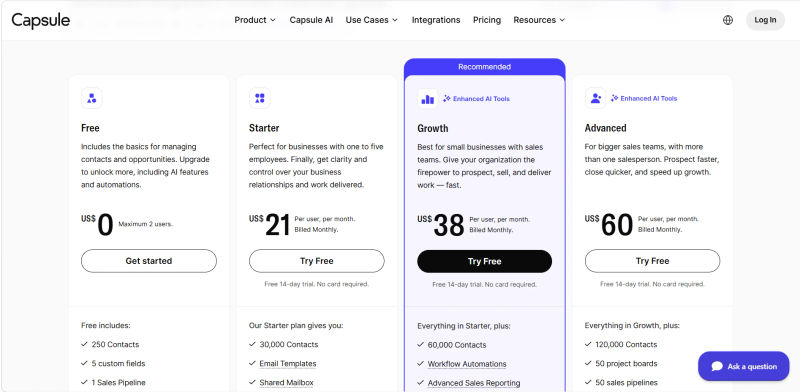
For businesses researching Capsule CRM pricing 2026, the structure remains straightforward and tailored for budget-conscious SMBs. The available plans are designed to scale with a business as its contact volume and feature requirements evolve. Capsule CRM typically offers a 14-day free trial, allowing users to test the platform's capabilities before committing to a paid tier. Additionally, annual billing options provide a discount over standard month-to-month rates, offering a cost-effective route for long-term adoption.
Plan | Price ($) | Best For | Features |
Free | $0 | Solo entrepreneurs & startups | - 250 contacts |
Starter | $21/user/month | Businesses with 1-5 employees | - 30,000 contacts |
Growth | $38/user/month | Small businesses with sales teams | - 60,000 contacts |
Advanced | $60/user/month | Bigger sales teams with 5+ salespeople | - 120,000 contacts |
Ultimate | Custom pricing | Scaling teams with 5+ users | - Dedicated account manager |
Note: All prices shown reflect typical monthly billing. Vendors often offer lower pricing for annual commitments, but those discounts are excluded here for easier comparison. Actual costs may vary depending on your requirements, usage volumes, and negotiated terms.
Understanding Value for SMBs
Capsule's per-user pricing is competitive and straightforward, with no forced annual contracts on lower tiers. When compared to the industry average CRM spend per employee, which hovers around US$26.36 globally, Capsule's plans are well-positioned. The key value proposition for SMBs is the lack of feature-gating on core functionalities. Even the Starter plan provides a complete, usable CRM experience, allowing businesses to grow into more advanced features rather than being forced to upgrade just to get essential tools.
Weighing trade-offs between Capsule and competitors?
Capsule CRM Free Plan: Features, Limits & Workflows (2026)
For small businesses and solopreneurs evaluating the Capsule CRM free plan features and limits in 2026, the most critical constraint is the database size. The Capsule CRM free plan contact limit is strictly capped at 250 contacts. Whether you are researching the Capsule CRM pricing free tier contacts for 2025 or 2026, this 250-contact limit remains unchanged. Once you exceed this threshold, or the 50MB storage limit, you must upgrade to a paid tier. The free plan is also restricted to a maximum of two users.
Regarding analytics, the Capsule CRM free reporting features are highly restricted. The free tier does not include the advanced custom reporting, sales analytics, or activity tracking found in the Professional and Enterprise tiers. Users are limited to basic pipeline overviews without the ability to generate granular performance reports.
Similarly, if you are searching for Capsule CRM free plan automation features and workflows in 2026, you will need to look toward paid upgrades. The free tier does not support automated workflows, email sequencing, or advanced task automation. All pipeline updates, follow-up reminders, and data entry must be managed manually. While it serves as a functional digital Rolodex with basic task tracking, businesses requiring robust automation workflows or expanded contact limits will quickly outgrow this introductory tier.
Capsule CRM Integrations
For a streamlined CRM like Capsule, a strong integration ecosystem is crucial. It allows the platform to act as a central hub connecting various business processes. Capsule excels in this area, offering a wide range of native integrations.
1. Popular Business Tools
Google Workspace: Our Capsule CRM Google Workspace integration features review highlights seamless, two-way synchronization. The Gmail add-on lets you log emails, add contacts, and create tasks directly from your inbox. It also includes automatic Google Calendar sync and Single Sign-On (SSO).
Microsoft 365: The Outlook integration offers similar functionality, allowing you to save contacts and emails directly to Capsule alongside core calendar synchronization.
2. Marketing & Communication Platforms
Mailchimp & FreshMail: Connect your email marketing platform to sync contacts, manage lists, and track campaign activity directly within Capsule, enabling better alignment between sales and marketing efforts.
3. Accounting & Finance Software
QuickBooks, Xero, & FreshBooks: This is a key integration for SMBs. Connecting your accounting software allows you to view a customer's payment history, outstanding invoices, or recent transactions directly on their contact record in Capsule, providing sales teams with valuable financial context before a call or follow-up.
4. Email Communication Capabilities
Beyond linking emails to contacts, Capsule offers email capabilities such as sending individual emails directly from contact records and leveraging simple email templates. While it doesn't offer advanced bulk email marketing features like Mailchimp, its integration with such platforms ensures a cohesive communication strategy.
Email communication capabilities become much more powerful for Capsule users when paired with Capsule’s Transpond marketing add-on, which brings a full-featured email marketing suite directly on top of CRM data. With Transpond, teams can design branded, responsive campaigns via a drag-and-drop editor, then automate follow-ups and nurture journeys triggered by Capsule events such as new opportunities or project updates. Because contacts, tags, custom fields, and saved lists sync bi-directionally in near real time, engagement signals like opens, clicks, and unsubscribes flow back into Capsule. This gives richer context to prioritize outreach, segment audiences, and keep all email-led communication tightly aligned with pipeline activity.
5. Customer Support & Data Security
Capsule CRM offers comprehensive customer support, typically through email and an extensive knowledge base, ensuring SMBs can quickly find answers and resolve issues. For data security, Capsule employs industry-standard encryption, regular backups, and adheres to strict privacy policies (e.g., GDPR compliance), providing peace of mind for businesses handling sensitive client information.
6. API & Custom Integrations
Zapier: For tools not natively supported, Capsule's Zapier integration opens up connections to thousands of other applications, allowing for extensive custom automation.
API: A well-documented API is available for businesses that need to build completely custom integrations with their proprietary software.

Capsule CRM Competitors & Alternatives
To truly understand Capsule's position in the market, it's essential to compare it to other popular CRMs for SMBs.
🔗 Need a CRM that works with your entire tech stack? Discover seamless alternatives — Compare Now
1. Capsule CRM vs. Zoho CRM
Zoho offers a vast ecosystem of business apps. Zoho Bigin is their direct competitor to Capsule, focusing on a simple pipeline-centric CRM for small businesses. Zoho CRM itself is a much more powerful and customizable platform that can scale to the enterprise level. Capsule is generally considered easier to learn and use out-of-the-box, while Zoho offers far greater depth and customization for those willing to invest the time in setup.
2. Capsule CRM vs. HubSpot CRM
HubSpot's primary advantage is its powerful free CRM, which is more generous than most competitors. However, its business model is to upsell users into its expensive 'Hubs' for Marketing, Sales, and Service. Capsule offers a more complete set of features at a lower price point than HubSpot's paid tiers. If your business is heavily focused on inbound marketing, HubSpot is a strong contender; if you need a straightforward sales and contact management tool, Capsule is more cost-effective.
3. Capsule CRM vs. Pipedrive
Both Capsule and Pipedrive are lauded for their excellent visual sales pipelines. Pipedrive is built almost exclusively for salespeople, with a heavy emphasis on activity-based selling and more advanced automation features. Capsule takes a more balanced approach, offering equally strong contact management alongside its sales pipeline, making it a better fit for businesses where relationship management is as important as the sales process itself.
4. Capsule CRM vs. Nutshell
Nutshell is another user-friendly CRM designed for B2B sales teams. It offers robust sales automation, contact management, and excellent reporting. Its pricing is often higher than Capsule's entry-level plans, but it includes more marketing automation features natively. The choice often comes down to budget and whether you need integrated email marketing sequences out of the box.
Exploring Niche & Flexible Alternatives
Freshworks CRM: Offers a good balance of sales and marketing features with a clean UI, often seen as a direct alternative to Zoho for businesses seeking an all-in-one solution.
Monday.com: Known for its project management capabilities, Monday has evolved to include a flexible CRM solution that is highly customizable but can require more initial setup to tailor to specific sales workflows.
Choosing the Right CRM for Your SMB
When making a decision, consider these factors: team size and technical skill, budget, primary business need (sales vs. marketing vs. relationship management), and required integrations. A tool is only effective if your team actually uses it, making Capsule's simplicity a powerful asset.
Is Capsule CRM the Right Choice for Your SMB in 2026?
After a thorough review, the answer depends on your business's specific profile and priorities. The CRM industry continues to trend towards AI augmentation and deeper integrations, but for a significant portion of the SMB market, usability remains the paramount concern.
Ideal User Profile
Capsule CRM is an excellent fit for:
Solopreneurs and Freelancers: Who need a professional way to manage clients and sales without a complex system.
Small Business Teams (2-50 employees): Particularly in sectors like consulting, creative agencies, and professional services where relationship tracking is key.
Startups: That need an affordable, scalable CRM that can be implemented quickly without diverting technical resources.
Businesses Prioritizing Simplicity: Any organization that values a low learning curve and high user adoption over an exhaustive feature list.
Try AuthenCIO
Move to faster, smarter software evaluation with AI
Final Recommendations & Next Steps
In 2026, Capsule CRM remains a top-tier choice for SMBs seeking a simple, intuitive, and effective tool for managing customer relationships and sales pipelines. Its unwavering focus on a clean user experience, combined with robust core CRM functionality and a low learning curve, makes it a standout option for businesses prioritizing user adoption and streamlined operations. For those prioritizing ease of use, affordability, and a powerful yet minimalistic approach, Capsule CRM emerges as a strong contender for the best CRM for small business in 2026.
The best way to know if a CRM is right for you is to see how it fits your unique workflow. Before you commit, it's crucial to compare your top choices side-by-side based on your specific needs.