
Introduction
If you are a freelancer or micro-business owner upgrading from spreadsheets to a dedicated Customer Relationship Management (CRM) platform, you need a tool that is simple, affordable, and effective. Bigin by Zoho is designed specifically to eliminate enterprise-level bloat and offer a streamlined, pipeline-centric experience.
In this comprehensive Bigin by Zoho CRM review for 2026, we evaluate its core features, pricing tiers, and real-world usability.
Streamline your software evaluation process
When analyzing Bigin CRM reviews, the consensus highlights its ease of use for managing leads and tracking deals without a steep learning curve. However, it may lack the advanced automation required by scaling mid-market teams. Throughout this Zoho Bigin review, we will break down its pros and cons, and see how it stacks up against alternatives like Pipedrive and Capsule.
Whether you need a quick Bigin review of its basic functions or a detailed Bigin by Zoho review to finalize your software choice, this guide provides the factual insights you need to decide if it is the right CRM for your growing venture.
Key Takeaways
Built for Micro-Businesses: Bigin by Zoho CRM is specifically designed for freelancers, solopreneurs, and small teams who need a straightforward, pipeline-centric CRM without the complexity and bloat of enterprise software.
Highly Affordable Pricing: It remains one of the most budget-friendly CRMs in 2026, offering a generous free tier and low-cost paid plans that provide exceptional value for money for tight budgets.
Streamlined Feature Set: The platform focuses entirely on the essentials—contact management, visual sales pipelines, basic workflow automation, and a highly rated mobile app—ensuring a minimal learning curve.
Seamless Integrations: It connects effortlessly with the broader Zoho ecosystem, Google Workspace, Microsoft 365, and other essential business tools to centralize daily operations.
Known Limitations: While perfect for simple sales processes, Bigin intentionally lacks the advanced marketing automation, complex reporting, and deep customization required by rapidly scaling mid-market companies.
Bigin by Zoho CRM Pros and Cons
No CRM is perfect for everyone. Bigin's strengths are directly tied to its focused design, but this also creates limitations. Here's a balanced look at its advantages and drawbacks for its target audience.
Advantages for Freelancers and Micro-Businesses
Exceptional Affordability: With a robust free plan and paid tiers starting at just $7/user/month, Bigin offers an incredible return on investment. It's one of the most budget-friendly, professional-grade CRMs available.
Intuitive and User-Friendly: The learning curve is minimal. The clean interface and pipeline-centric design make it easy for users without any prior CRM experience to get up and running in hours, not weeks.
Outstanding Mobile App: Bigin’s mobile functionality is best-in-class, providing full access to key features on the go. This is a critical advantage for business owners who aren't chained to a desk.
Seamless Zoho Ecosystem Integration: For businesses already using or considering other Zoho products (like Zoho Books or Zoho Campaigns), Bigin integrates flawlessly, creating a unified business management suite.
Focused on Core Needs: By avoiding feature bloat, Bigin excels at what it does best: contact and deal management. It helps small businesses implement best practices without unnecessary complexity.
Potential Drawbacks to Consider
Limited Customization: While you can customize pipelines and fields, Bigin lacks the deep customization options of larger platforms. Businesses with highly unique or complex sales processes may find it restrictive.
Basic Reporting: The built-in analytics are great for a high-level overview but lack the advanced forecasting and in-depth reporting capabilities that data-driven, fast-scaling businesses might require.
Fewer Native Integrations: Compared to competitors like Monday.com or HubSpot, Bigin has a smaller library of native third-party integrations. While it connects with major apps via Zapier, direct integrations can be more seamless.
May Be Outgrown Quickly: The same simplicity that makes Bigin attractive can become a limitation. A rapidly growing business may find itself needing more advanced marketing automation, customer service tools, or sales features sooner than expected, necessitating a migration to a more robust platform like Zoho CRM.
Best for:
Small businesses seeking a simple, secure CRM.
Verdict:
A reliable entry‑level CRM that balances privacy and ease of use.

Software covered in this article
To help you evaluate Bigin by Zoho in the right context, this article compares it against a carefully curated set of competitors:









What is Bigin by Zoho CRM?
Bigin is a lightweight, pipeline-centric CRM developed by Zoho for micro-businesses, freelancers, and startups. Its origins trace back to a press release from Austin, Texas, where "Zoho announces Bigin: new pipeline-centric CRM solution built and priced specifically to help small businesses" transition away from spreadsheets.
While Zoho's flagship CRM competes with enterprise giants, Bigin serves a different market. It’s designed for users who need more than manual tracking but aren't ready for the complexity or cost of a full-scale CRM. Over 89% of companies with less than $50 million in revenue utilize Zoho's CRM solutions, and Bigin acts as the perfect entry point into this ecosystem.
Designed for Simplicity and Efficiency
The core philosophy behind Bigin is radical simplicity. It strips away the extraneous features that overwhelm small teams and focuses intensely on the essentials of sales and contact management. The entire experience is built around a visual sales pipeline, allowing users to see the status of every deal at a glance. This approach helps demystify the sales process, turning abstract goals into a concrete, manageable workflow.
Think of Bigin as the bridge between manual tracking and a full-featured CRM. It provides the structure and automation needed to prevent leads from falling through the cracks, without requiring a dedicated administrator or extensive training. It’s built for users who need to manage client interactions effectively while juggling every other aspect of their business, making it a compelling choice for its target audience.
Bigin by Zoho CRM Features: A Deep Dive
Bigin's feature set is intentionally focused. It prioritizes the tools that deliver the most immediate impact for a small business's sales and client management efforts. Let's break down the core functionalities.
1. Core Contact Management
At its heart, Bigin provides a centralized database for all your contacts, leads, and company information. This goes far beyond a simple address book. Bigin offers a 360-degree view of every contact, consolidating their details, communication history (emails, calls), associated deals, and even social media profiles into a single, clean interface. For a freelancer juggling ten clients, this means no more frantic searching through old emails to recall the details of the last conversation. Every note, every follow-up task, and every interaction is logged and accessible. This unified view is critical for maintaining consistent, personalized communication, which is a key differentiator for small businesses competing against larger players.
2. Streamlined Sales Pipelines
This is where Bigin truly shines. The platform is built around visual, drag-and-drop sales pipelines. Users can create multiple pipelines to manage different processes. For instance, a freelance consultant could set up one pipeline for 'New Client Leads' and another for 'Ongoing Project Upsells' to keep their diverse client work organized. Each pipeline consists of customizable stages (e.g., 'Lead In,' 'Initial Contact,' 'Proposal Sent,' 'Negotiation,' 'Won/Lost'), providing a clear, visual representation of the entire sales funnel. This visual approach to deal management is far more intuitive than a spreadsheet and makes it easy to identify bottlenecks and prioritize efforts. Client data shows that implementing such streamlined CRM tools can lead to 30% faster deal closures and 40% improved deal tracking accuracy within six months. While platforms like Pipedrive offer more advanced pipeline analytics, Bigin's simplicity is its strength for those new to CRM.
3. Task Automation and Workflow
Even simple automation can be a game-changer for a time-strapped solopreneur. Bigin offers straightforward workflow automation that handles repetitive administrative tasks. For instance, you can set up a rule to automatically create a follow-up task three days after you send a proposal, or send a standardized welcome email the moment a new lead is added to the system. These automations, while basic compared to the complex, multi-step workflows possible in HubSpot or Zoho CRM, are incredibly effective at ensuring consistency and freeing up mental bandwidth. Teams using lightweight CRM automation report saving over six hours per week per representative, a massive productivity boost for a small operation. This focus on practical, easy-to-implement automation is a key value proposition for Bigin.
4. Mobile App Functionality and Accessibility
For freelancers and micro-business owners who are constantly on the move, a powerful mobile app isn't a luxury; it's a necessity. Bigin's mobile app for iOS and Android is frequently cited as one of its best features. It offers full functionality, allowing users to add new leads, update deal stages, make calls, send emails, and view dashboards directly from their phone. Imagine meeting a potential client at a networking event; you can add their details and create a new deal in Bigin before you even get back to your car. This mobile-first design ensures that the CRM works around your schedule, not the other way around, making it a practical tool for dynamic, modern small businesses.
5. Reporting and Analytics for Micro-Businesses
Bigin provides a set of pre-built, easy-to-understand dashboards and reports. Users can quickly visualize key metrics like their sales pipeline, deals won versus lost, and activity leaderboards. These analytics are designed to provide actionable insights without requiring a degree in data science. You can easily see which lead sources are performing best or how long deals typically stay in each stage of your pipeline. While it lacks the deep custom reporting and forecasting capabilities found in more advanced CRMs like Monday.com or Freshworks, Bigin’s reporting is perfectly adequate for a micro-business focused on core sales performance and activity tracking. It answers the most critical questions without causing analysis paralysis.

Bigin by Zoho CRM Pricing: Is it Affordable?
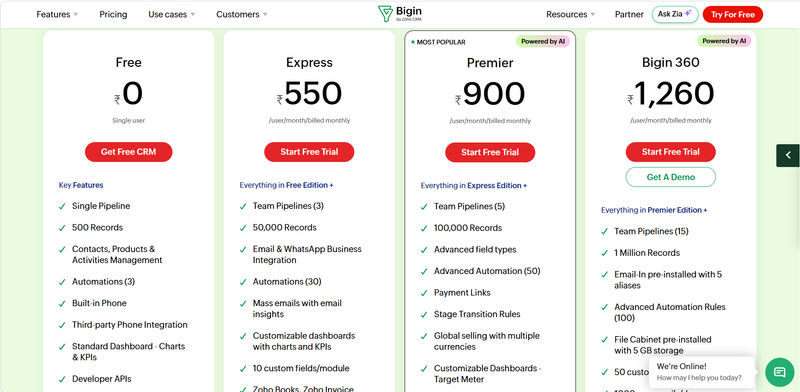
Affordability defines Bigin by Zoho CRM pricing 2026. Built for tight budgets, Zoho Bigin pricing avoids hidden fees. When evaluating Zoho Bigin pricing per user per month 2026, the structure is straightforward: a Free tier, an Express plan ($7/user/month), and a Premier plan ($12/user/month). This transparent Bigin CRM pricing ensures micro-businesses get maximum value without complex add-ons.
Bigin by Zoho Pricing Tiers (2026)
Bigin offers a tiered pricing model that allows businesses to start small and scale as they grow. The free plan is genuinely useful for a single user, while the paid tiers unlock more advanced features and higher usage limits for growing teams.
Feature / Limit | Free | Express | Premier | Bigin 360 |
Price (per user/month, billed annually) | $0 | $7 | $11 | $15 |
Pipelines | 1 | 3 | 5 | 15 |
Records (total) | 500 | 50,000 | 100,000 | 1,000,000 |
Automation rules (advanced/total) | 3 instant workflows (basic) | Limited basic workflows | 50 advanced automations | 100 automation rules with time-based triggers |
Custom fields per module | Basic defaults only | Up to 25 custom fields | Higher limit than Express | 50 custom fields per module |
Mass emails per day (org) | Not available / very limited | Limited mass email (starter) | Higher than Express | 1,000 mass emails/day |
Dashboards | Standard dashboard only | Multiple custom dashboards | More dashboard capacity | Up to 50 dashboards |
Ideal fit | Solo user testing CRM | Small teams formalizing pipeline | Growing teams needing more automation | Fast-growing small businesses managing end-to-end customer journey |
Note: All prices shown reflect typical monthly billing. Vendors often offer lower pricing for annual commitments, but those discounts are excluded here for easier comparison. Actual costs may vary depending on your requirements, usage volumes, and negotiated terms.
Value for Money Analysis
The value proposition of Bigin is exceptionally strong, particularly at the Standard and Premier price points. For just $7 per user per month, the Standard plan provides almost everything a small business needs to get started with a professional CRM, including multiple pipelines, significant contact limits, and crucial workflow automation. This price point is significantly lower than many competitors, making it one of the most affordable CRM solutions on the market.
The Premier plan, at $12 per user, adds more pipelines, advanced customization, and deeper integrations, offering a logical upgrade path for businesses that are scaling successfully. The free plan, while limited to one user and one pipeline, is an excellent way for a solo freelancer to digitize their process and test the platform's core functionality without any financial risk. Overall, Bigin's pricing strategy effectively removes the cost barrier that prevents many micro-businesses from adopting a CRM in the first place.
Not sure whether Free, Express, Premier, or Bigin 360 is overkill for your team? Explore the right tier and total cost for you.
Integrations: Connecting Bigin with Your Ecosystem
A CRM's power is magnified by its ability to connect with the other tools you use daily. Bigin offers a solid, if not exhaustive, set of integrations that cover the essential needs of a micro-business.
1. Essential Business Tool Integrations
Bigin integrates natively with a suite of essential applications. For communication, it offers deep integration with Microsoft 365 and Google Workspace, allowing you to sync calendars, contacts, and emails seamlessly. This means you can manage client communication from within your preferred inbox while having it all logged automatically in the CRM.
It also connects with key Zoho applications like Zoho Books (for accounting), Zoho Campaigns (for email marketing), and Zoho Forms (for lead capture). For businesses that need to connect with other software, Bigin supports Zapier, which acts as a bridge to thousands of other apps. This is crucial for automating workflows, such as connecting a lead capture form on your website to automatically add new inquiries into Bigin, or sending deal updates to a project management tool like Trello.
2. Importing Existing Data & Migration Tips
For any business moving away from spreadsheets, the initial data import is a critical step. Bigin simplifies this process, allowing users to easily import contacts, deals, and other records from CSV or XLS files. You can map the columns from your spreadsheet to the corresponding fields in Bigin, ensuring a smooth transition. For those using Google Contacts, a direct integration makes the migration even easier. A key tip for a clean import is to first sanitize your spreadsheet: ensure consistent formatting for names and phone numbers, remove duplicate entries, and fill in any missing data before you begin the import process.
3. API and Customization Potential
For businesses with development resources, Bigin provides APIs that allow for custom integrations and functionality. This enables you to connect proprietary software or build unique workflows tailored to your specific business needs. While most of Bigin's target audience may not leverage the API directly, its availability provides a path for scalability and ensures the platform isn't a complete black box.
Worried you’ll outgrow Bigin too fast or choose a tool that’s too complex? Compare “grow‑with‑you” CRM paths tailored to your roadmap in a few clicks. 👉
Bigin vs Zoho CRM: What's the Difference?
The main difference in the zoho crm vs bigin debate comes down to complexity and scale. Bigin is a pipeline-centric, lightweight CRM designed specifically for micro-businesses and freelancers who need to move away from spreadsheets. In contrast, Zoho CRM is a comprehensive, enterprise-grade platform built for scaling sales teams with complex automation, advanced analytics, and multi-channel marketing needs.
Here is how they compare across key areas:
Target Audience: Bigin is for solopreneurs and small teams needing rapid setup. Zoho CRM is for growing mid-market to enterprise businesses requiring deep customization.
Feature Set: When comparing zoho bigin vs crm features, Bigin focuses strictly on core contact management, basic pipelines, and simple workflows. Zoho CRM includes advanced lead scoring, AI prediction (Zia), territory management, and inventory tracking.
Pricing and Limits: Bigin is significantly cheaper with strict limits on records and custom fields. Zoho CRM scales up in price but offers expansive customization and higher data allowances.
If you are deciding between bigin vs zoho crm, start with Bigin if you want a plug-and-play solution to track deals. You can always seamlessly upgrade to Zoho CRM later if your business outgrows Bigin's capabilities, as both share the same underlying data architecture.
Bigin by Zoho CRM vs. Competitors: Best Lightweight Alternatives
Bigin operates in a competitive space. Understanding how it compares to other popular lightweight CRMs is crucial for making an informed decision. Each alternative has its own unique strengths, catering to slightly different user needs.
1. Bigin by Zoho vs. Capsule CRM
Capsule CRM is another strong contender known for its extreme simplicity and clean user interface. Where Bigin offers a slightly more feature-rich experience with things like built-in telephony and more workflow rules at a lower price point, Capsule appeals to the absolute minimalist who wants the cleanest possible interface. Bigin generally offers more features and better value for the money.
2. Bigin by Zoho vs. Folk CRM
Folk takes a different approach, positioning itself as a collaborative, relationship-focused CRM. It excels at contact organization and outreach, making it a fantastic tool for networking-heavy businesses. While it has pipeline features, its core strength is in managing relationships. Bigin is more explicitly a sales pipeline tool, designed around the deal flow.
3. Bigin by Zoho vs. Nutshell CRM
Nutshell is a user-friendly CRM that offers unlimited contact storage on all plans and includes built-in email marketing automation features, a significant advantage over Bigin. However, Nutshell comes at a higher price point. It's a great option for businesses that want to combine their sales pipeline and email marketing into a single platform and are willing to pay a premium for that convenience.
4. Bigin by Zoho vs. Pipedrive CRM
Pipedrive is arguably the king of pipeline-centric CRMs and is a direct, more powerful competitor to Bigin. Pipedrive is hyper-focused on the sales pipeline, offering more advanced features for deal tracking, sales forecasting, and reporting. It is also more expensive and can be more complex than Bigin. Bigin is the simpler, more accessible entry point, while Pipedrive is the upgrade for teams that need a more robust, sales-driven tool.
5. Bigin by Zoho vs. Monday.com CRM
Monday.com is a highly customizable work operating system (Work OS) with a powerful CRM product. Its greatest strength is its flexibility; you can build and customize almost any workflow or process. However, this flexibility comes with a steeper learning curve and a higher price tag. Bigin is a plug-and-play solution with a defined structure, making it faster to set up and easier to manage.
6. Bigin by Zoho vs. Freshworks CRM
Freshworks offers a suite of business tools, and its CRM is known for its user-friendly interface and AI-powered features. It provides a more all-in-one solution, incorporating sales, marketing, and even chat functionalities. Freshworks is a step up from Bigin in terms of scope and complexity, catering to businesses that are ready to integrate their sales and marketing efforts more deeply.

7. Bigin by Zoho vs. HubSpot CRM
HubSpot offers a famously powerful free CRM that is more comprehensive than Bigin's free plan, particularly in its marketing features. The HubSpot Starter CRM suite is a direct competitor to Bigin's paid plans and offers a more integrated marketing and sales experience. However, HubSpot's pricing can escalate quickly. Bigin remains the more affordable and straightforward choice for businesses that need a simple, pipeline-focused tool without extensive marketing features.
Ultimately, while Bigin excels in affordability and simplicity for core pipeline management, the best alternative depends on specific needs—whether it's Capsule for ultimate minimalism, Pipedrive for advanced sales focus, or HubSpot for integrated marketing capabilities.
Who is Bigin by Zoho CRM Best Suited For?
After a thorough analysis, a clear picture emerges of the ideal Bigin user. It is not a one-size-fits-all solution but is exceptionally well-suited for a specific segment of the business world.
1. Ideal Use Cases for Micro-Businesses
Bigin is a perfect fit for service-based micro-businesses (1-9 employees) that are formalizing their sales process for the first time. Think of small marketing agencies, consulting firms, photography studios, or local trade businesses. These organizations need a central place to track leads from their website, manage client projects through a pipeline, and ensure timely follow-ups. The ability to create multiple pipelines is a key advantage, allowing them to manage different service lines or business processes separately. The low cost and easy setup mean they can adopt a professional tool without a significant investment of time or money.
2. Why Freelancers Love Bigin
For freelancers and solopreneurs, Bigin is a game-changer. It replaces the precarious system of spreadsheets and mental notes with a structured, reliable process. The key benefits are the powerful mobile app, which allows them to manage their business from anywhere, and the simple automation that handles follow-up reminders. A freelance writer, for example, can use Bigin to track article pitches to different publications, moving each one through stages like 'Pitched,' 'In Review,' 'Commissioned,' and 'Paid.' This brings a level of professionalism and organization that helps them win more business and manage their workload effectively, all for free or a very low monthly cost.
Try AuthenCIO
Move to faster, smarter software evaluation with AI
Final Verdict: Is Bigin by Zoho CRM the Right Choice for You?
Bigin by Zoho has carved out a crucial niche in the crowded CRM market. It successfully delivers on its promise of providing a simple, affordable, and powerful pipeline-centric CRM for micro-businesses and freelancers. Its strengths—an intuitive interface, an excellent mobile app, and unbeatable pricing—make it a standout choice for anyone taking their first serious step into organized sales and client management.
However, its focus is also its primary limitation. Businesses with complex sales cycles, a need for deep analytics, or a desire for an all-in-one marketing and sales platform will likely find Bigin too restrictive. It is a fantastic starting point, but fast-growing companies should anticipate eventually graduating to a more comprehensive system like Zoho CRM or HubSpot.
Key Takeaways for Decision Making
Bigin by Zoho CRM serves as an excellent stepping stone for micro-businesses and freelancers transitioning from spreadsheets to a dedicated visual sales pipeline. It delivers on its promise of simplicity and affordability, though rapidly growing teams will eventually need a more robust system for advanced automation, deep forecasting, and extensive customization.
Your next step is to evaluate how Bigin aligns with your specific daily workflows and integration needs. To finalize your choice and compare Bigin against other CRMs based on your unique business requirements, explore vendor-neutral platforms like Authencio.com. This ensures you select the right solution confidently and without sales pressure.